
Release Highlights
Form Builder
Improved Social Login User Experience
We’ve made improvements to the social login experience across registration (new name) and login forms.
Registration Forms: After a user successfully authenticates with Google or Facebook, the namespace and password fields are now hidden to prevent confusion and eliminate the need to create a separate username/password.
Login Forms: Following successful social authentication, the namespace and password fields are hidden here as well. We’ve also added clear messaging and a loading indicator to show that the form is processing and will auto-submit. This provides better transparency and reduces uncertainty during login.
These updates create a smoother, more intuitive experience for users choosing social authentication.
Other Updates
Settings
View Sales Products
Sales products, which are used for single copy magazine sales or Shopify stores in our system, previously had no configuration visibility within Database Settings. Users with the appropriate permissions can now view these products in the Product section. This update makes essential configuration information—such as Payment Details—clearly visible in one place. As a result, teams have improved transparency and can more effectively manage Sales product data across the organization.
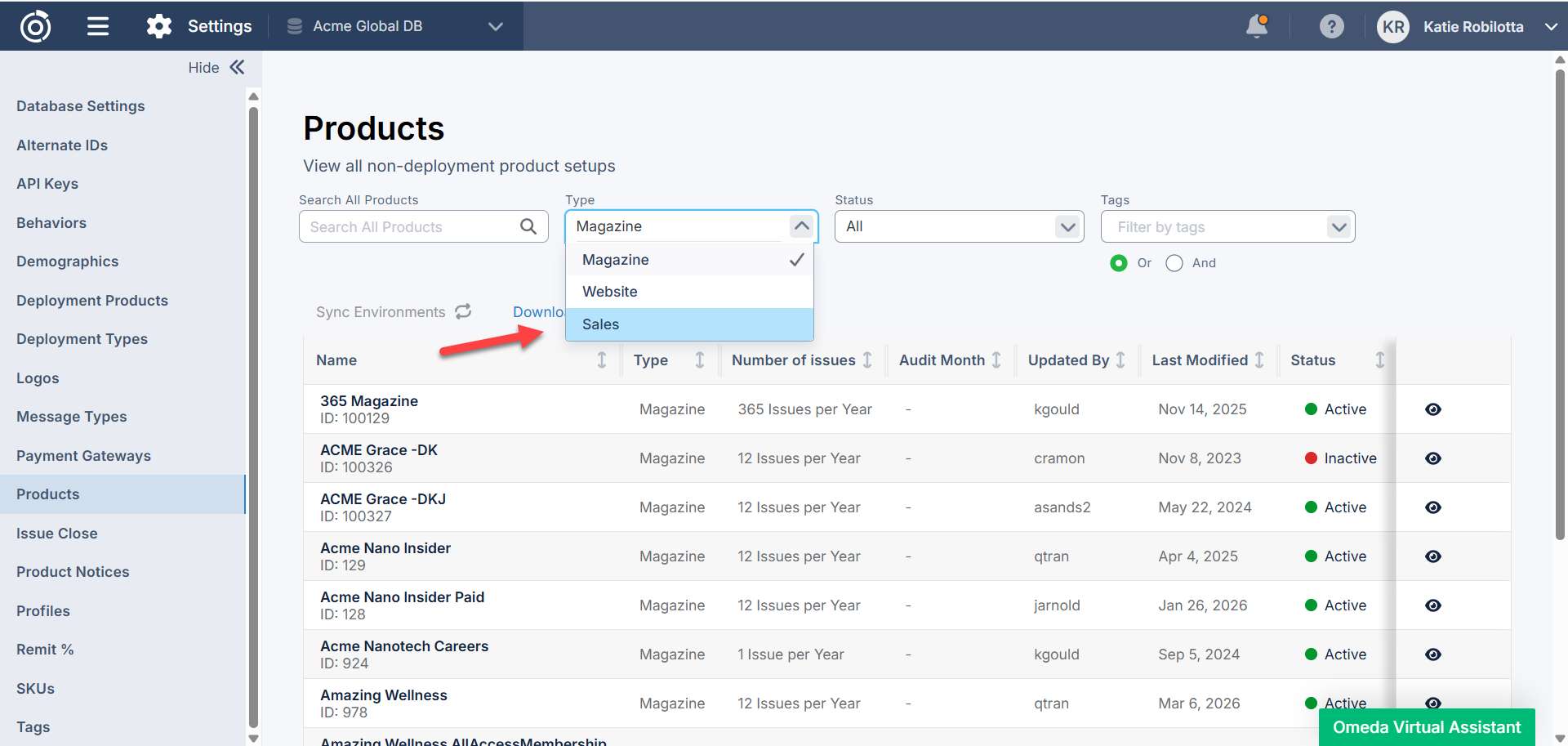
Table of Contents
Questions?
Omeda customers should reach out to their Client Success Manager or search the Knowledge Base for assistance. Comprehensive platform training can also be found on the Omeda Academy.
If you’re new to Omeda, please reach out to sales@omeda.com for assistance.